


Firehouse Subs
4.88.96K Reviews
App Specs
- Version
- 12.6.0
- Updated On
- License
- Free
- Downloads
- 1,000,000+
- Developer
- Firehouse Subs
- Categories
- Food & Drink
- Platform
- Android, iOS
Screenshots
 Analysis by AppCompare
For someone who already enjoys Firehouse Subs, a dedicated ordering app can make the small decisions around lunch easier: choosing a restaurant, checking a meal, and planning when to collect it. I see the appeal most clearly when I know what I want and would rather spend less time sorting out the order at the counter. The app is free, and its focus is straightforward: putting Firehouse Subs ordering and rewards in one place.
A focused tool for regular visits
This is a Food & Drink app from Firehouse Subs, rather than a general restaurant-discovery service. That distinction matters. If I am choosing between several kinds of food, a delivery marketplace is more useful; if I have already decided on Firehouse Subs, a direct app is the more natural place to start. It keeps the experience centered on that restaurant instead of asking me to filter through unrelated menus.
That focus also sets a limit. The app makes the most sense for people who visit Firehouse Subs often enough to care about placing orders and keeping up with rewards. If I only want to compare nearby restaurants, find the cheapest lunch across different chains, or order from a place I have not chosen yet, I would use a broader alternative. This app is for making a Firehouse Subs visit more convenient, not for deciding where to eat in the first place.
What its current version tells me
The app has been around since July 2014, and its current version is 12.3.0. That gives existing users a useful point of reference: this is an established product with a continuing version history, not a newly launched ordering experiment. The version number alone does not tell me which individual features changed or when they arrived, so I would not treat it as proof that a particular screen or policy has recently been updated.
That separation between what is visible and what I might hope for is important. A later version can reflect maintenance and product work, but it does not guarantee a particular improvement on every phone or at every restaurant. I would check the app itself before relying on a detail that matters to my order, especially if I am trying a new location or making a time-sensitive pickup.
Diving into the Firehouse Subs Experience
Okay, so I downloaded the Firehouse Subs app with the hope of finding a quick and easy way to satisfy my sandwich cravings. First off, the app is available on both Android and iOS, which is super convenient. As soon as you open it, you’re welcomed with a vibrant interface that’s both inviting and easy to navigate. No need to be a tech whiz here; everything is laid out simply and clearly.
Getting Started
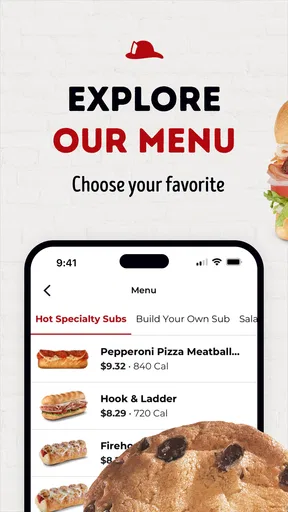
Setting up an account is a breeze. You can either sign up with your email or connect through your social media accounts. Once you’re in, it’s like having a Firehouse Subs restaurant right in your pocket! You can browse through their extensive menu, which is a feast for the eyes, I must say. Each sub comes with detailed descriptions, and the images make you want to order everything.
Worth Reading Before You Choose

EA SPORTS FC Mobile 26 Is a Bigger Football Game, but It Takes Time

Flipboard Shows What News Apps Must Do Beyond the Feed

Switching to Android Auto Means Rethinking Your Driving Routine

Google Calendar Makes a Crowded Week Easier to Manage

Ludo King Makes the Most of the Minutes Between Plans

Baby Panda World Brings Quick Play to Modern Phones, but Its Game Library Feels Busy
Ordering Made Easy
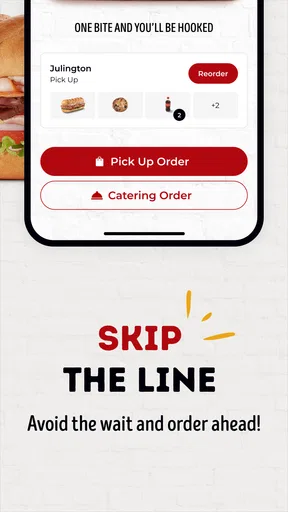
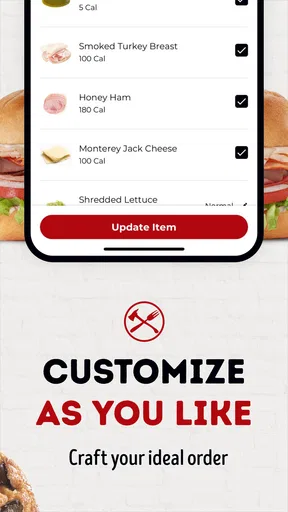
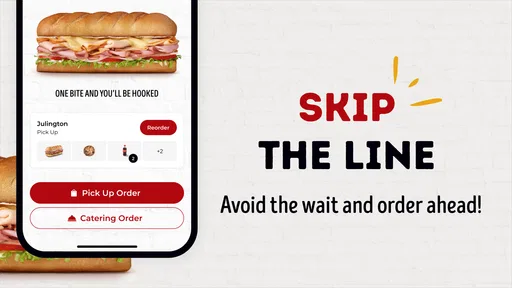
Now, let’s talk about ordering. The app allows you to customize your sub just the way you like it. Whether you want extra cheese, hold the onions, or add some jalapeños for that fiery kick, it’s all possible. Just a few taps, and your perfect sandwich is ready to go. And, if you’re like me, always in a rush, the app’s quick reorder feature is a blessing. It remembers your previous orders, making it super easy to get your favorite sub again.
Making a saved order work for you
Quick reorder is most helpful when my usual sandwich is genuinely unchanged. I would still pause to review the details before confirming, particularly if I am ordering for someone else or changing what I want that day. A saved order is a shortcut, not a substitute for checking the selections. For a group lunch, I would keep each person’s customizations distinct rather than assuming one familiar order can be adapted without a careful look.
Customization is useful for preferences, but I would not treat it as a guarantee that every possible substitution will be available at every restaurant. The practical approach is to make the choices the app presents, read the finished order, and resolve any uncertainty before submitting it. That small check is especially worthwhile when an ingredient matters to the meal rather than being a casual preference.
Rewards and Deals
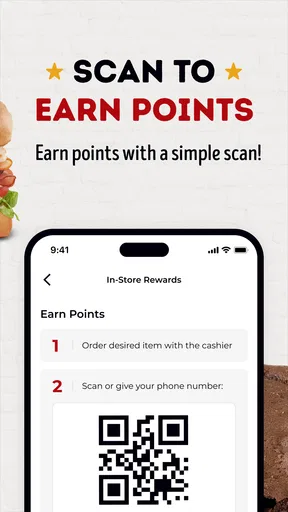
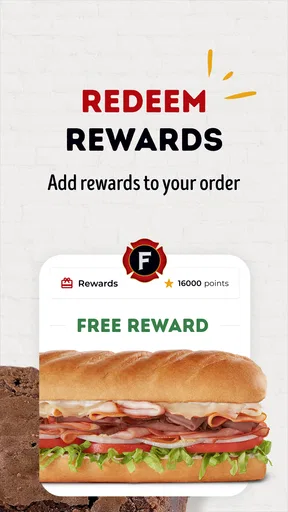
Who doesn’t love a good deal? The app has a built-in rewards program where you earn points for every purchase. These points can be redeemed for free subs or other goodies. Plus, the app regularly features exclusive deals and promotions. So, you’re not just getting a tasty meal but also some sweet savings. Keep an eye out for those notifications!
Using rewards without overthinking lunch
I would treat rewards as a bonus on meals I already planned to buy, rather than a reason to add an extra visit. Before placing an order, it is sensible to check the rewards area for the offer or redemption option that applies to that visit and make sure the intended account is in use. That is a better habit than assuming a reward will attach automatically in every situation.
For a family or a work lunch, the useful question is not simply whether points exist; it is whether the order is being placed in a way that keeps the rewards tied to the right customer. I would decide who is placing the order and using the account before everyone starts choosing sandwiches. It avoids a last-minute scramble and keeps the app’s convenience from turning into an account mix-up.
Location and Pickup Options
Another thing I appreciate about the app is the location finder. It uses your GPS to locate the nearest Firehouse Subs restaurant, which is perfect when you’re on the move. You can choose between pickup or delivery, depending on your mood. I personally love the convenience of ordering ahead and just swinging by to pick up my order without any wait.
Planning pickup around a real day
Imagine I have a short lunch break and am driving between errands. I can look for a nearby Firehouse Subs, decide what I want before arriving, and place an order for pickup instead of spending the break browsing at the counter. The useful part is not just saving a few taps; it is being able to make the food decision before I reach the restaurant. I would still leave room for the visit itself, since ordering ahead does not mean I should assume the meal will be ready at an exact moment.
When I am in an unfamiliar area, I would check the selected restaurant carefully before paying attention to the rest of the order. A nearby result is not necessarily the most convenient one if I am heading in another direction, and selecting the wrong location can undo the benefit of ordering ahead. If the restaurant choice or pickup plan is unclear, a direct call or an in-person order may be less stressful than pressing through while distracted.
Where it fits beside other ordering options
Compared with a delivery marketplace, the direct app is appealing when I want a Firehouse Subs order and want its rewards experience close at hand. A marketplace can be better when I am comparing multiple restaurants or organizing a delivery from a wider selection. The trade-off is focus: the Firehouse Subs app is not trying to be an all-purpose food directory, and I would not expect it to replace one.
Compared with ordering at the counter, the app gives me more time to consider the menu and customize without holding up the line. Counter ordering can still be the better choice if I want to ask a question, change my mind while speaking with staff, or avoid setting up an account. I see the app as an extra route into the restaurant, not a reason that every customer should abandon the straightforward in-person option.
Who will get the most from it
I would recommend it most to repeat customers who already know the menu, appreciate ordering ahead, or want to keep track of the rewards program. It can also suit someone who is new to the restaurant but prefers to look over the choices privately before deciding. The menu descriptions and pictures make browsing feel less rushed than choosing while other people wait behind me.
On the other hand, someone who rarely eats at Firehouse Subs may not get much value from maintaining another restaurant account. The same goes for a person who prefers to make every choice face to face or whose main goal is to compare many food brands at once. In those cases, a general ordering service or a direct visit may be a better fit than installing a single-chain app.
Compatibility and day-to-day expectations
The app is free and rated for Everyone, so the basic barrier to trying it is low. It has a 4.8 average from around 60,000 ratings, with about 8,700 written reviews, and it has passed one million installs. Those figures suggest broad interest, but they do not promise that every order will feel effortless; the experience still depends on the choices I make and the restaurant I select.
For device planning, the listed minimum operating system is 7.0. I would check that my phone meets that requirement before troubleshooting an installation problem. The app is on Android and iOS, but compatibility is still worth checking on an older device, especially if the operating system has not been updated in a long time.
Feedback and Customer Support
Feedback is crucial for any app, and Firehouse Subs nails it with their customer support. If you ever encounter an issue or have a suggestion, the app makes it easy to reach out to their team. They’re responsive and genuinely care about improving your experience. It’s nice to feel valued as a customer, you know?
What I would watch for as it evolves
With version 12.3.0 as the current release, I would pay attention to practical improvements that affect repeat visits: whether choosing a restaurant stays clear, whether saved orders remain easy to review, and whether the rewards flow is understandable before checkout. Those are the areas that make a single-chain ordering app useful in ordinary life. They are also the places where a small change can either smooth out a regular routine or add an avoidable extra step.
I would not infer a roadmap from the version number, and I would judge future changes by what I can actually use rather than by a promise of a more polished experience. For existing users, the best reason to keep the app is that it fits a familiar order or rewards habit. If it no longer saves effort for the way you visit, ordering at the restaurant remains a perfectly reasonable alternative.
In conclusion, the Firehouse Subs app is a must-have for any sandwich lover. It’s intuitive, full of options, and makes ordering a breeze. Plus, with all the rewards and deals, you’re getting more than just a meal. Whether you’re a regular or a newbie, this app will surely enhance your Firehouse Subs experience. So, next time you’re in the mood for a delicious sub, you know where to turn.
Pros
- User-friendly interface with easy navigation.
- Extensive menu with detailed item descriptions.
- Convenient order tracking feature.
- Seamless payment options
- including digital wallets.
- Loyalty program integration for rewards.
Cons
- Limited customization for dietary preferences.
- Occasional app crashes and slow loading.
- No option for group orders or split payments.
- Local store availability varies by region.
- Limited customer support within the app.
FAQs for Firehouse Subs
What features does the Firehouse Subs app offer?
The Firehouse Subs app provides a range of features designed to enhance your ordering experience. You can easily customize and place orders for pickup or delivery. The app also offers a rewards program, allowing you to earn points on every purchase, track your order history, and receive exclusive offers and promotions.
How does the rewards program in the Firehouse Subs app work?
The rewards program lets you earn points with every purchase made through the app. For every dollar spent, you earn points that can be redeemed for free items or discounts. The app tracks your points automatically and notifies you of available rewards, making it easy to enjoy your favorite subs while saving money.
Is there an option for dietary preferences in the app?
Yes, the Firehouse Subs app accommodates various dietary preferences by allowing customization of your order. You can modify ingredients to meet your dietary needs, such as removing specific items or adding others. The menu also highlights options for vegetarian and gluten-free choices to ensure you find something that suits your taste.
Can I use the Firehouse Subs app for group orders?
The app is designed for individual and group orders, making it convenient for office lunches or family meals. You can easily add multiple items to a single order and customize each one according to your group's preferences. The streamlined checkout process ensures a quick and efficient ordering experience for everyone.
Is the Firehouse Subs app available on both Android and iOS?
Yes, the Firehouse Subs app is available for download on both Android and iOS devices. You can find it on the Google Play Store for Android and the Apple App Store for iOS. The app is free to download and offers a seamless user experience, ensuring you can order your favorite subs with ease from any device.


